Word Search
The Word Search tool uses pattern matching to find words within your word list. These can be simple patterns with wildcards for missing letters, or can involve complex combinations of pattern elements. The syntax is as follows:
| Pattern Element | Description | Examples |
|---|---|---|
. |
Matches any single character | c.t matches cat, cot, cut |
* |
Matches zero or more characters | c*t matches cat, coat, cut |
[abc] |
Matches any one of the characters inside the brackets | c[ao]t matches cat, cot |
;abc |
Matches any anagram of the specified letters | ;act matches cat, tac, act. |
*(;abc)* |
Matches any word that fits the surrounding patterns and contains an anagram of the specified letters | ..(;grange).. matches congregate |
1-9 |
Each digit represents a single letter, and may be reused for the same letter in the rest of the pattern | 12...21 matches addenda, lateral, etc. |
Pattern elements may be combined. For example, anagrams may include wildcards: ;bairn... matches airborne, banister, etc. bltyndvs111111 matches indivisibility.
To perform your word search, simply enter a pattern into the text field and click the magnifying glass beside it:
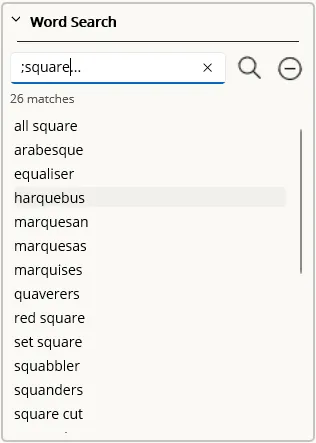
When you select a light from the grid, the existing letters in that light will automatically be passed into the word search tool as a wildcard pattern and the search performed, though you may override that with your preferred pattern while the light remains selected.
If a light is selected and the word search results include words of the correct length for the light, double-clicking the result will populate it into the grid, overwriting any existing letters.
When a pattern has been entered into the text field, pressing the “no entry” button will add that pattern to your list of excluded patterns, as described in the Application settings dialogue, preventing it from appearing in future search results.